
- Deep Linking From Apple App Store and Google Play Installs
- What’s Possible on Apple App Store and Google Play Today
- Deep Linking Completes the Personalization Story
- High-Impact Use Cases for Deep Linking After Install
- Custom Store Listing → Deep-Linked Onboarding
- Extending Deep Linking with Contextual Onboarding
- Using Deep Links Beyond the App Store
- How to Get Started
- Final Thoughts
This article is a companion to our previous article on Custom App Store listings.
Companies spend significant time and budget optimizing the moment a user decides to install. Then the user opens the app, and the experience resets. The intent that carried them through an ad and the App Store often disappears at first launch.
Ads are targeted. Store listings are customized and messaging is tuned to a specific use case or audience (though publishers often skip implementing custom product pages that target different customers and miss key revenue).
Then the user opens the app…
…and the experience resets.
Most users land in a generic home screen or default onboarding flow, regardless of how or why they installed. The intent that carried them through an ad and the App Store often disappears at first launch. For teams focused on acquisition efficiency, this is a quiet but costly drop-off point.
A typical post-install experience looks like this:
ad → store listing → install → generic onboarding
When the in-app experience doesn’t reflect the context a user came from, friction reappears. The user has to re-orient themselves, re-learn value, and sometimes re-discover the feature they were promised. Some do. Many don’t.
Deep linking solves this problem.
Deep Linking From Apple App Store and Google Play Installs
Deep linking allows you to send users to a specific destination inside your app, rather than a default starting point. When combined with app installs, this often takes the form of deferred deep linking, where context is preserved even if the app isn’t installed at the moment a user clicks or taps.
In practice, this means you can connect:
ad → custom store listing → install → specific in-app experience or onboarding flow
The goal is continuity. The user should feel like they landed exactly where they expected to be.
What’s Possible on Apple App Store and Google Play Today
Apple App Store
The App Store itself doesn’t deep link users into your app after install. However, Apple explicitly supports pairing Custom Product Pages with deep links so users land in a relevant in-app location after install.
From Apple’s App Store marketing guidance:
“Create additional versions of your app’s product page to highlight specific features or content, discoverable through unique URLs that you share. Add a deep link to direct people to a specific area of your app for a seamless experience.”
In practice, this often involves:
- directing traffic to a Custom Product Page
- passing campaign or page context through install
- routing the user to a relevant screen or onboarding flow on first launch
Google Play
Google Play offers more flexibility through:
- install referrer parameters
- deferred deep links
- direct deep linking into app activities
This allows Android apps to route users more directly to feature-level destinations, especially for campaign-specific installs or re-installs.
The core principle remains the same on both platforms: intent should survive the install.
Deep Linking Completes the Personalization Story
Custom App Store and Google Play listings solve the pre-install relevance problem. They ensure users see screenshots and messaging aligned with why they clicked.
Deep linking solves the post-install relevance problem.
Without deep linking:
- a TikTok-focused store page leads to a generic tutorial
- a feature-specific listing leads to a home screen
- a pricing-driven campaign leads to an onboarding flow that doesn’t reflect intent
Each break in continuity increases the chance a user abandons before activation.
With deep linking:
- the feature highlighted in the store is the first thing users see
- onboarding reinforces the same value proposition
- the app experience is congruent for the user from the first interaction
High-Impact Use Cases for Deep Linking After Install
1. Campaign-Specific Onboarding
If a store listing highlights a specific feature or workflow, deep linking can send users directly into:
- a tailored onboarding sequence
- a feature walkthrough
- a contextual setup screen
- a relevant upsell flow
This reduces time to value and increases activation.
2. Persona-Based Entry Points
Different audiences install for different reasons.
Use Case 1: Language Learning App
A language learning app runs ads targeting professionals interested in learning a language for business. The ad drives users to a short questionnaire landing flow designed to understand their goals.
The user has selected an interest in Mandarin and is sent to a custom App Store or Google Play listing that highlights Mandarin lessons focused on business conversations and workplace scenarios.
Without deep linking:
The user installs the app and lands in a generic onboarding flow that asks them to choose a language and learning path again. The intent captured in the questionnaire and reinforced in the store listing is lost, forcing the user to repeat steps before reaching value.
With deep linking:
The user lands in a custom onboarding flow configured for Mandarin and business use cases. The first in-app experience reflects the ad, the questionnaire, and the store listing — creating a seamless transition from interest to action.
Example 2: Streaming Service
A streaming service promotes a new original series through social and search campaigns. The custom store listing highlights that specific show.
Without deep linking:

Users install the app and land on the home screen or a paywall, where the promoted show may or may not be visible. Some users scroll and others abandon.
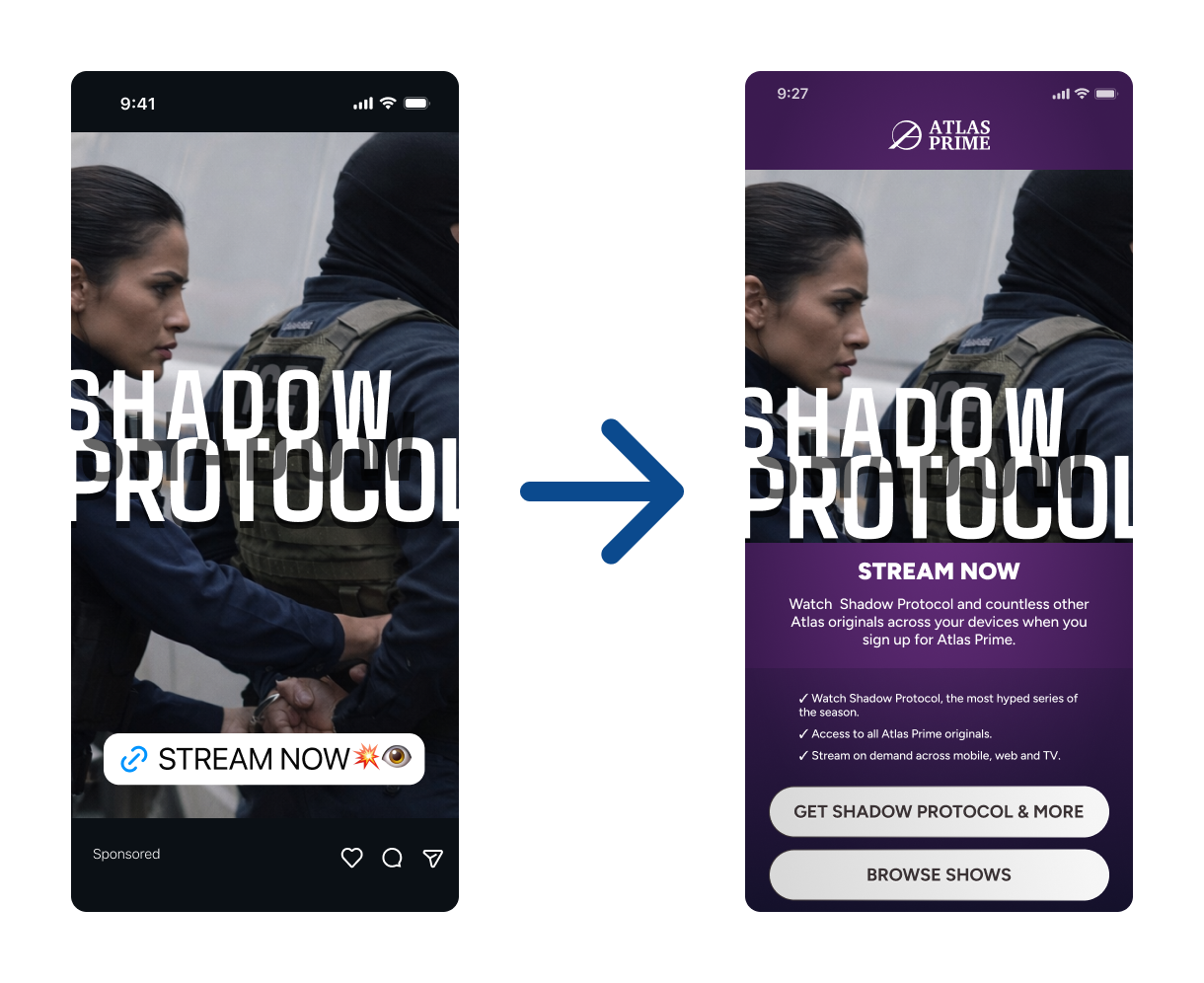
With deep linking:

The user is taken directly to the show’s detail page or a curated onboarding experience that introduces the series and complimentary catalog titles, and prompts playback. The install immediately delivers on the promise that drove the download.
3. Subscription and Paywall Alignment
If a store listing emphasizes premium value, the first in-app monetization moment should reflect that promise. Deep linking helps ensure paywalls and upgrade prompts align with what motivated the install.
4. Reinstalls and Re-Engagement (Especially on Android)
Returning users don’t need to see onboarding again. Deep linking can route them directly back to relevant content or features, improving re-engagement performance.
Custom Store Listing → Deep-Linked Onboarding
A fully aligned journey might look like this:
ad → custom store listing → install → deep-linked onboarding
A user clicks a TikTok ad, lands on a TikTok-specific store listing, installs, and opens the app to an onboarding flow that is a continuation of what they saw in the ad and store screenshots.
The story remains consistent from entry through onboarding and first use.
Extending Deep Linking with Contextual Onboarding
Deep linking determines where a user lands. Onboarding is the experience that welcomes a user into your app or digital product.
Tools like Nami Flow Builder allow teams to map deep link context to onboarding flows, paywalls, and experiences. Instead of treating all new users the same, onboarding can reflect:
- campaign source
- feature interest
- audience segment
- monetization intent
This ensures the relevance gained through custom store listings and deep linking doesn’t disappear once the app opens.
Using Deep Links Beyond the App Store
The same deep links used to preserve intent after install can also be used outside of the App Store in ads, emails, and other marketing touchpoints.
For users who already have the app installed, deep links can open the app directly to the most relevant in-app destination. For users who don’t, those same links can route through a custom App Store or Google Play listing before installation.
For example, a streaming or sports app promoting a specific soccer match can send:
- new users to a store listing highlighting live sports coverage
- existing users directly to the match’s detail page or live stream
In both cases, the user lands exactly where they expect. The only difference is whether the App Store is part of the journey.
How to Get Started
Teams typically begin with:
- identifying high-intent social or paid search campaigns
- building two or more custom product pages that present the right experience to the right audience
- defining deep or deferred deep links to the ideal in-app destination
- aligning onboarding and monetization flows to that entry point
- measuring activation, not just clicks or installs
Even modest alignment between store messaging and first app experience can produce meaningful gains.
Final Thoughts
Custom App Store listings help users decide to install.
Deep linking ensures they arrive where they expect to be.
Together, they turn acquisition into activation, and intent into engagement.