
In this article, we’ll guide you through the steps needed to implement promotional in-app purchases on iOS. We’ll explain what promotional in-app purchases are, how to set them up in App Store Connect, and provide expert tips to ensure successful implementation and maximize user engagement.
What are Promotional in-app purchases (IAPs)?
Promotional in-app purchases are essential tools provided by Apple to help developers enhance the visibility of their in-app purchases (IAPs) and drive revenue. By utilizing these promotional features, developers can showcase their IAPs directly on their app’s product page, making it easier for potential users to discover and purchase premium content without needing to explore the app first.
Key promotional methods include highlighting specific IAPs on your App Store listing, leveraging Apple Search Ads to target relevant keywords, and ensuring that your in-app purchases are indexed and searchable on the App Store. These tools not only improve the discoverability of your app’s premium offerings but also allow you to present these options to users at various stages of their interaction with your app, increasing conversion opportunities.
Through App Store promotions, developers can strategically drive attention to consumables, subscriptions, and non-consumable IAPs, creating more opportunities to convert users into paying customers.
Key elements:
Key aspects of promotional in-app purchases include:
-
Discounted or Bonus Offers: The promotions can provide discounted prices or extra content (like more virtual currency or items) than what is normally available.
-
Time-Sensitive: These offers often run for a limited time, creating urgency for users to make the purchase.
-
Event-Based or Seasonal: Developers may tie these promotions to events like holidays, app updates, or special milestones (like an app anniversary).
-
App Store Integration: Both Apple’s App Store and Google Play Store support promotional IAPs, allowing developers to showcase these offers outside of the app (e.g., on the app’s listing page).
-
Marketing Strategy: Promotional IAPs are a part of a broader user acquisition and retention strategy, often paired with push notifications, emails, or in-app messages to notify users of the deals.
-
Free Trials: In some cases, promotional IAPs may also offer free trials of premium features, which can later convert into paid subscriptions.
👉Read more: Free Trial Strategies for Higher Conversion Rates
How to Promote In-App Purchases on iOS: A Step-by-Step
Step 1: Set Up In-App Purchases in App Store Connect
Before you can promote IAPs, ensure they are correctly configured in App Store Connect.
-
Login to App Store Connect: Go to App Store Connect.
-
Select Your App: From the dashboard, choose the app you want to add IAPs to.
-
Navigate to In-App Purchases: In the left-hand menu, click on the “Features” tab, then select “In-App Purchases.”
-
Add New IAP: Click on the “+” icon to add a new IAP. You can choose from four types of in-app purchases:some text
- Consumable
- Non-consumable
- Auto-renewable subscription
- Non-renewing subscription
-
Configure IAP Details: Provide clear and engaging names, descriptions, and pricing. Add icons or screenshots relevant to the IAP to make them attractive.
-
Submit for Review: Once you’ve added all the necessary details, submit the IAP for review by Apple.
Step 2: Promote IAPs on the App Store Product Page
You can display specific IAPs directly on your app’s product page for users to see before downloading.
- Go to App Store Connect: Access your app in App Store Connect.
- Select Your App and Navigate to In-App Purchases: From the Features tab, go to “In-App Purchases.”
- Enable Promotion on App Store: For each IAP, toggle the “App Store Promotion” option.
- Organize IAP Display: Organize how IAPs appear on your product page to highlight the most important ones. Make sure they are relevant and valuable to users.
Step 3: Use Apple Search Ads to Promote In-App Purchases
Apple Search Ads allow you to promote specific IAPs through ads in search results.
-
Set Up an Apple Search Ads Account: Go to Apple Search Ads and create an account.
-
Create a Campaign:some text
- Choose your app.
- Set your budget and targeting options (such as keywords).
-
Target Specific In-App Purchases: Use the campaign to promote relevant IAPs to users searching for similar features.
-
Monitor and Optimize: Regularly track the performance of your Search Ads campaigns, adjust keywords, and optimize spending based on user engagement.
Step 4: Optimize Your App Store Listing
To make your app more attractive, optimize your product page with a focus on IAPs:
- Update Screenshots: Include images that showcase premium features or exclusive content that users can unlock via IAPs.
- App Preview Videos: Create short videos demonstrating in-app purchases or the benefits they provide.
- Enhance Your App Description: Highlight how IAPs improve the user experience. Include key features that users can unlock by purchasing.
- Use Keywords: Optimize your App Store listing with relevant keywords that describe your IAP offerings to increase discoverability.
Step 5: Use Push Notifications and In-App Messaging
Leverage in-app messaging and push notifications to remind users about your IAPs:
- Set Up Push Notifications: Implement push notification services like Firebase Cloud Messaging or OneSignal in your app.
- Personalized Offers: Use user data to send personalized offers. For example, send a message offering a discount on premium content a user has shown interest in.
- Promote Limited-Time Offers: Create urgency by promoting discounts or exclusive content available for a limited time. Be sure to get user consent for notifications in compliance with Apple’s rules.
Step 6: Promote IAPs Outside the App Store
Use external marketing strategies to drive traffic to your app and promote IAPs.
- Social Media Campaigns: Post content about your app’s IAPs on platforms like Instagram, Twitter, or Facebook. Highlight the benefits and share links directly to the App Store.
- Collaborate with Influencers: Partner with influencers or content creators who can showcase your app and promote its IAPs to their followers.
- Email Marketing: Send emails to your app’s user base with information on new or discounted IAPs. Use tools like Mailchimp to track performance.
Step 7: Track and Optimize Your Campaigns
After implementing the promotion strategies, continuously monitor the performance of your in-app purchases.
- Use Analytics Tools: Utilize tools like Google Analytics or App Store Connect Analytics to track IAP conversions and user engagement.
- A/B Testing: Test different pricing, descriptions, and offers for your IAPs to see what performs best.
- Adjust Campaigns: Based on analytics, refine your promotions by adjusting your ad campaigns, optimizing keywords, or improving your push notification offers.
👉Read more: Setup Apple Offer Codes
5 Pro Implementation Tips for Your Promotional In-App Purchases
1.Provide Friendly Name and Description in Metadata
Each promotional in-app purchase has a name and description.
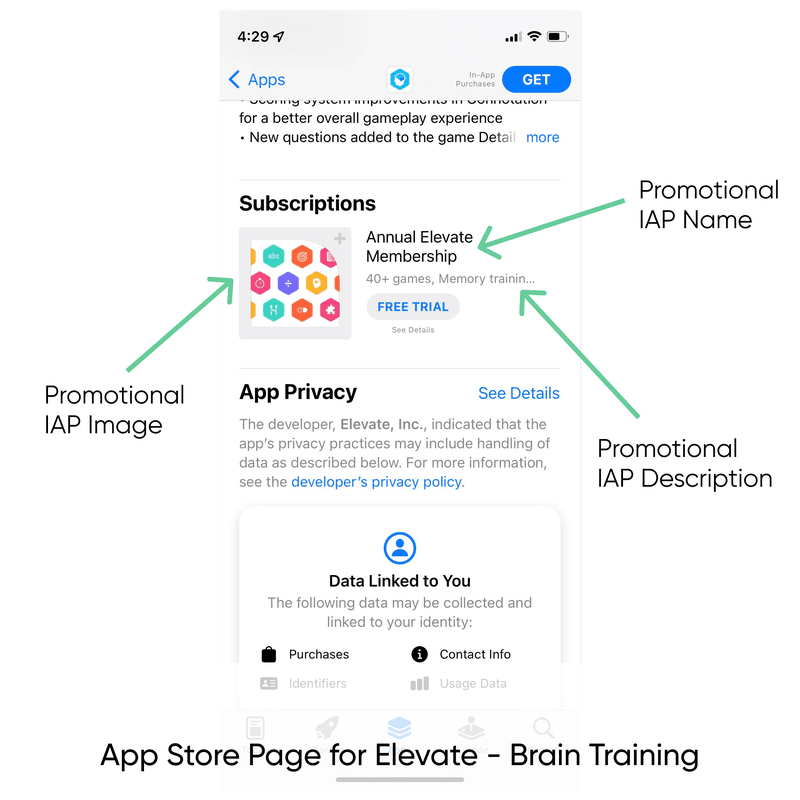
The name should be different from your app’s name and describe the purchase in some human-readable way. In other words, don’t give it a name of promo_1_month. For the description, provide up to 45 characters of details about what the purchase unlocks. Try to avoid generic terms like ‘Unlock all access.’ That doesn’t help your customer understand the benefits of what they are buying!
2. Design a new Image for your Promotional In-App Purchase
Your promotional IAP should use a different image than your app logo. This is because in search results, Today, Games, and Apps tabs, your promo IAP will display with your app logo next to it. So make sure your logo isn’t repeated! Design a promo image with similar elements to your logo without completely copying it.
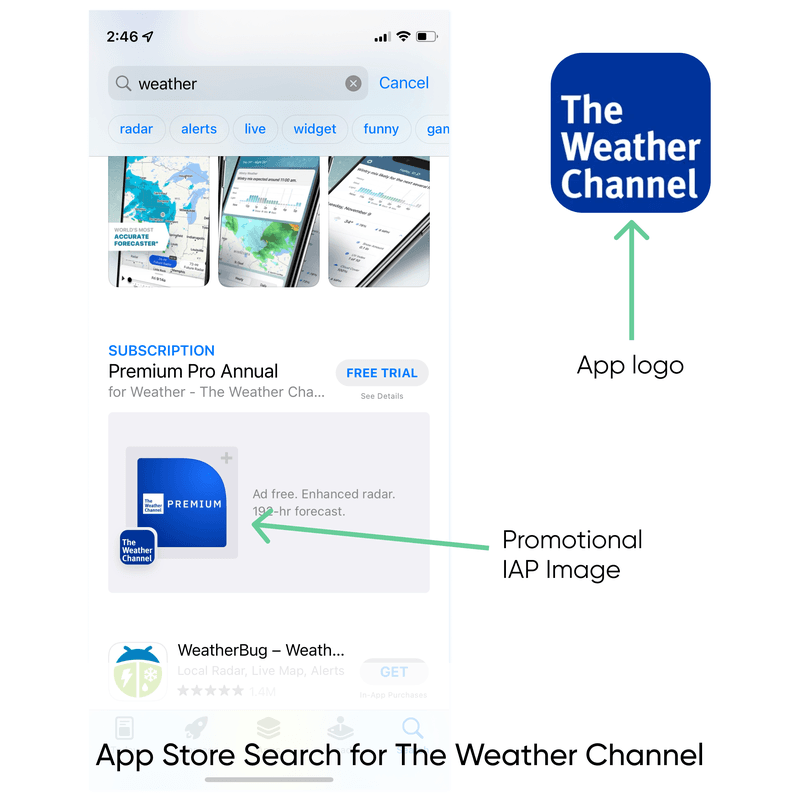
Promotional IAP from The Weather Channel app
3. Choose the Right Size and Layout for your Image
Apple has a particular size and layout for the promotional in-app purchase images. Their guidelines recommend a 1024 x 1024px image, either in .png or .jpeg format.
Apple also places the image in a frame. Make sure your image has plenty of padding on all sides, especially the bottom left where the app icon is inset.
To test your image, you can upload into App Store Connect for a live preview.
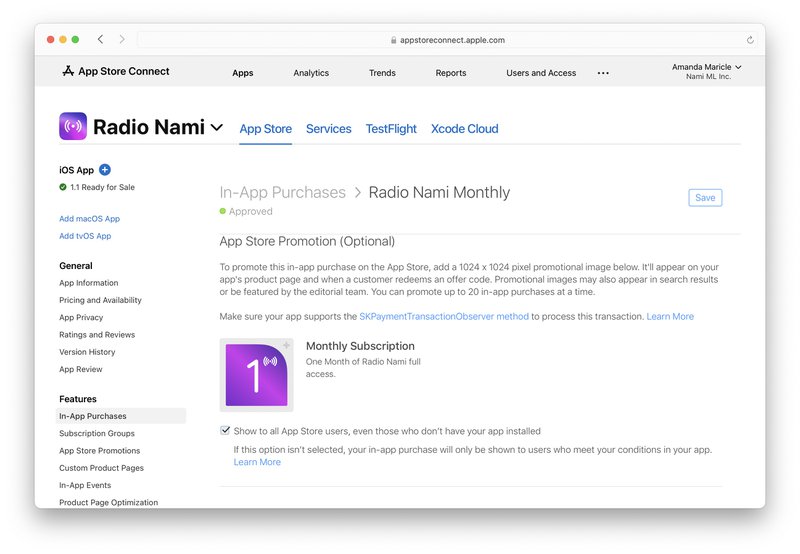
Testing an in-app promotional image live in App Store Connect
You can also download Apple’s design resources and use the Sketch files to hone your design.
4. Use Consistent Branding for Your Promotional In-app Purchase Images
Your app has a brand and a style. Use these guidelines when designing your IAP images.
Gentler Streak uses their mascot in their promotional images. In the monthly image, the mascot is standing. In the yearly image, the mascot is moving. This cute detail helps represent the benefits of purchasing the yearly plan.
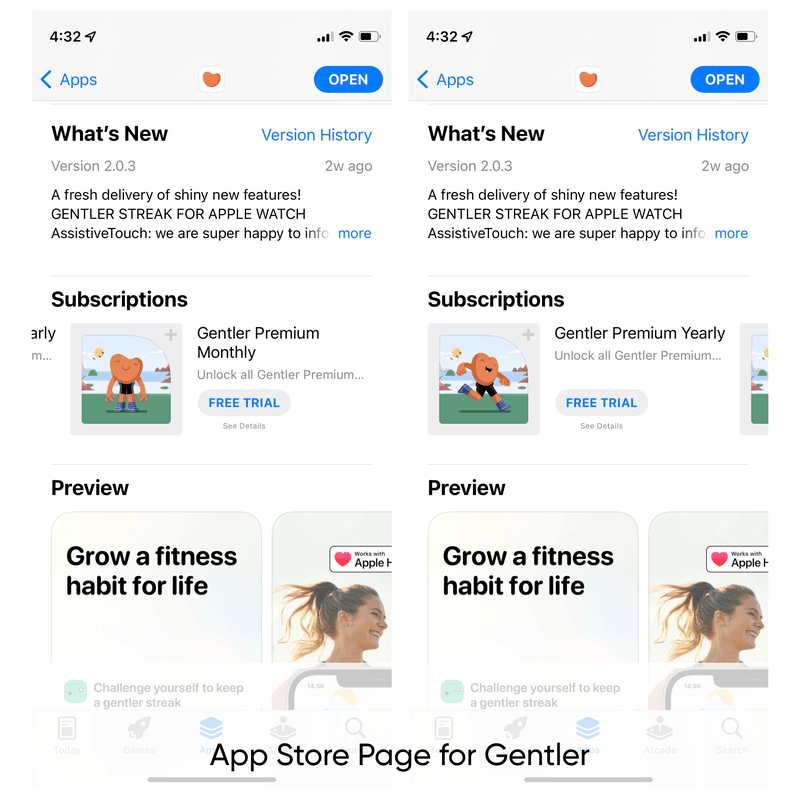
Promotional images for Gentler Streak app
The CARROT weather app utilizes the lightning bolt from their icon to represent premium.
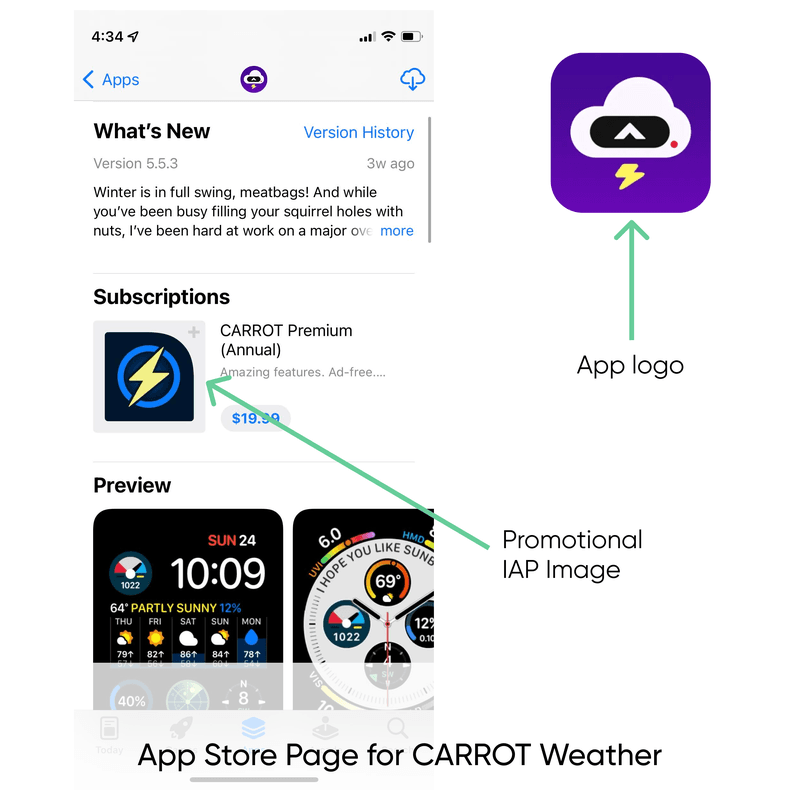
CARROT Weather app store page
5. Create an Image for Each Product
You might sell multiple products in app: monthly or yearly plans, purchase packs, or lifetime access. Creating unique images for each of these products will help sell the benefits.
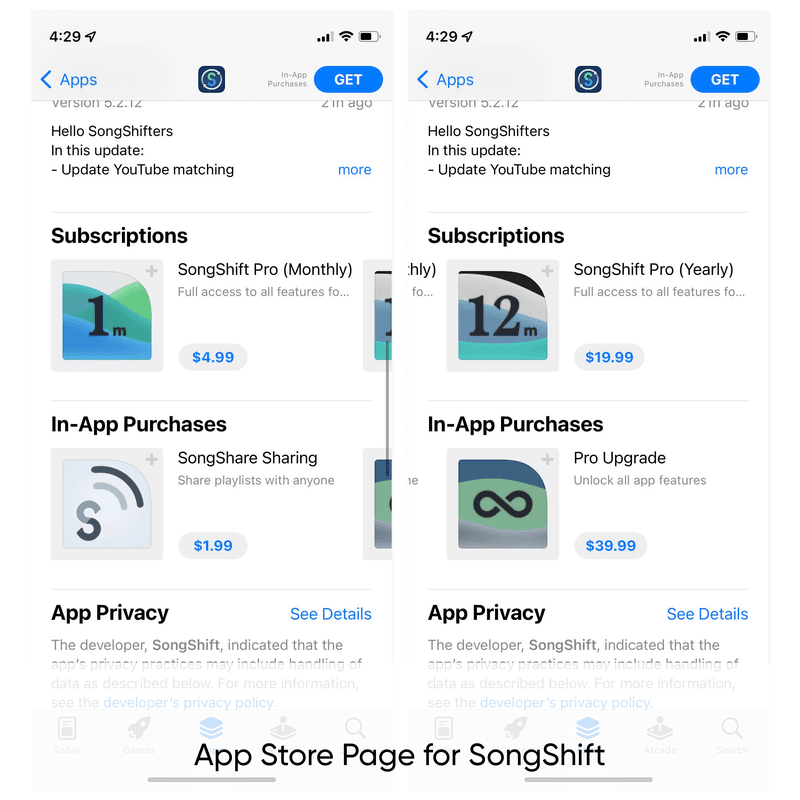
Conclusion
Promoting in-app purchases effectively on iOS involves leveraging both Apple’s built-in tools like App Store promotions and Search Ads, as well as external marketing channels. By following these steps, you can increase visibility and encourage more users to make purchases in your app.
Explore more ways to enhance your app’s growth with NamiML’s low-code solutions. We offer tools to streamline the management and promotion of in-app purchases, helping you scale your app’s revenue effortlessly. Visit NamiML.com for more information. are a great way to showcase your in-app purchases on the App Store and invite users to purchase before even downloading the app.