Product updates

Older updates

Everything we've shipped before the current window. Recent activity lives on the main product updates page.

Category
Capability
42 updates

April 2026

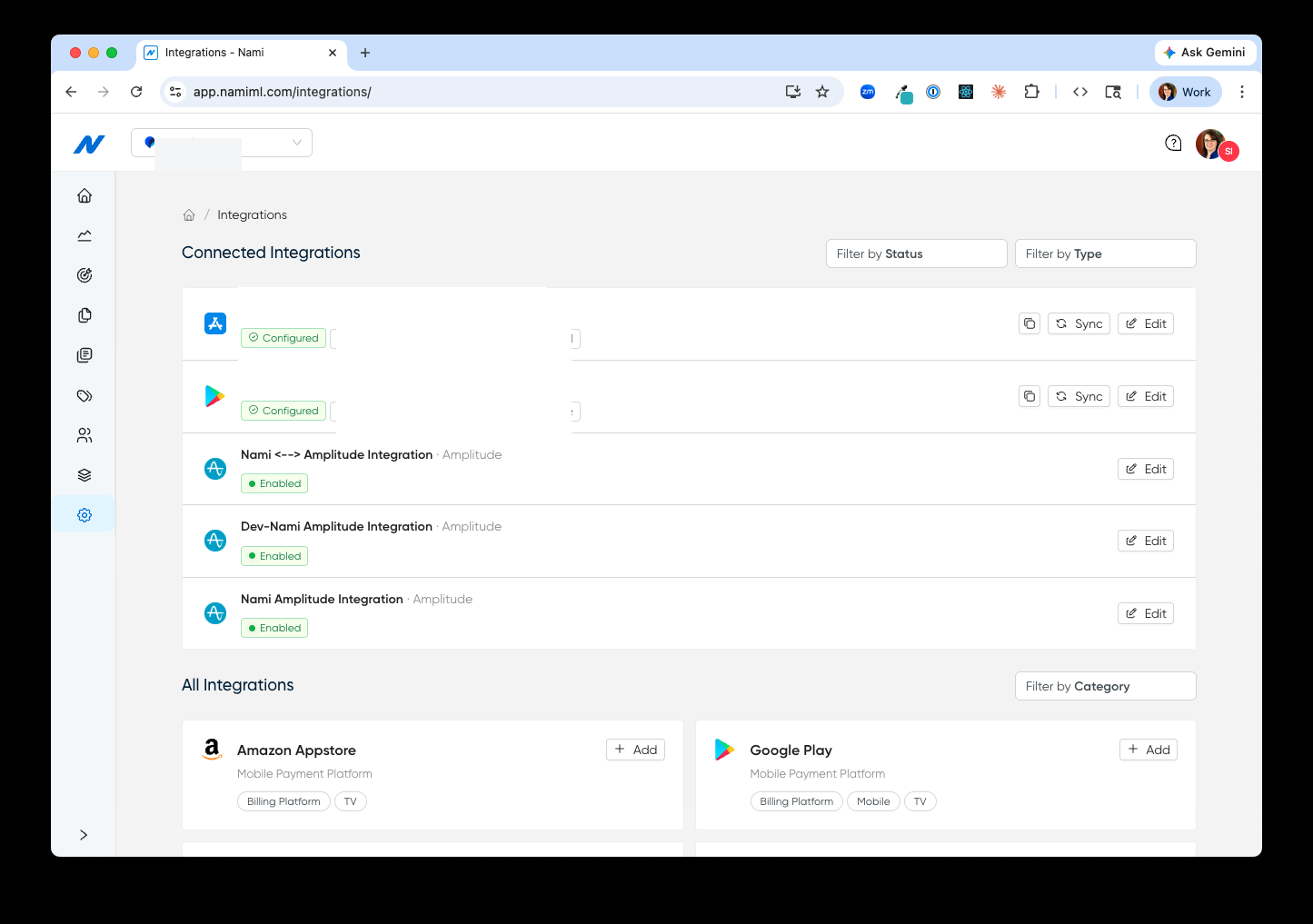
Integrations Page Refresh

A redesigned Integrations page built to support many integrations, with quick sync and one-click access to platform IDs.

The Integrations page has been redesigned to better support teams running many integrations at once. Connected integrations now surface their status, platform IDs, and a sync action right on the row — so kicking off a re-sync or grabbing an app store ID for development no longer means digging through configuration.

A separate “All Integrations” section lists everything Nami can connect to, filterable by category, so adding the next integration is a single click.

Read more

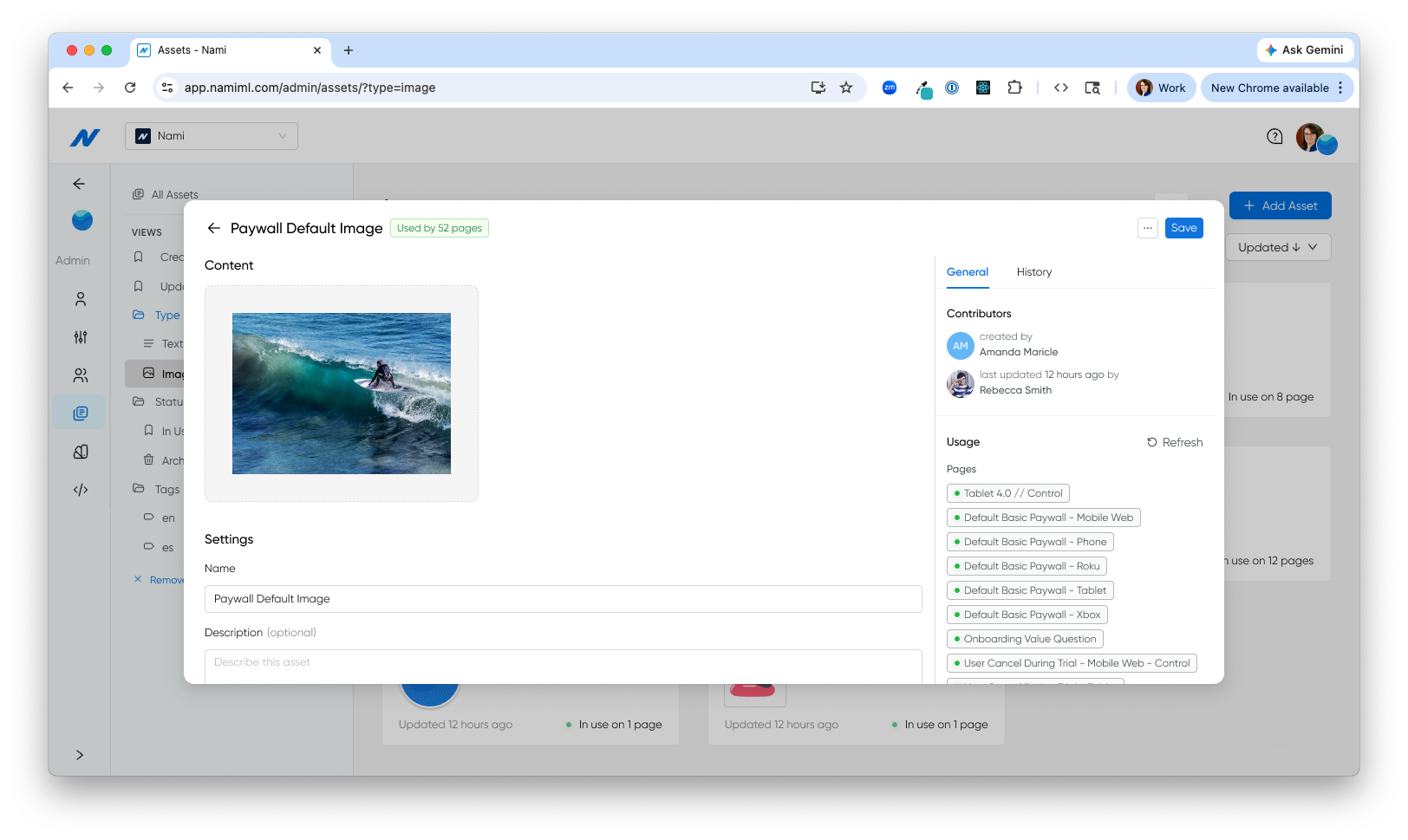
Asset Usage

See every page using a shared text or image asset before you edit it.

Open any shared text or image asset and the detail view now lists every page that references it. Teams can gauge the impact of a copy change or image swap before making it, instead of discovering it live on a paywall.

The same usage signal drives the in-use filter in the redesigned Assets list and disables the archive action when an asset is still wired into a page.

Read more

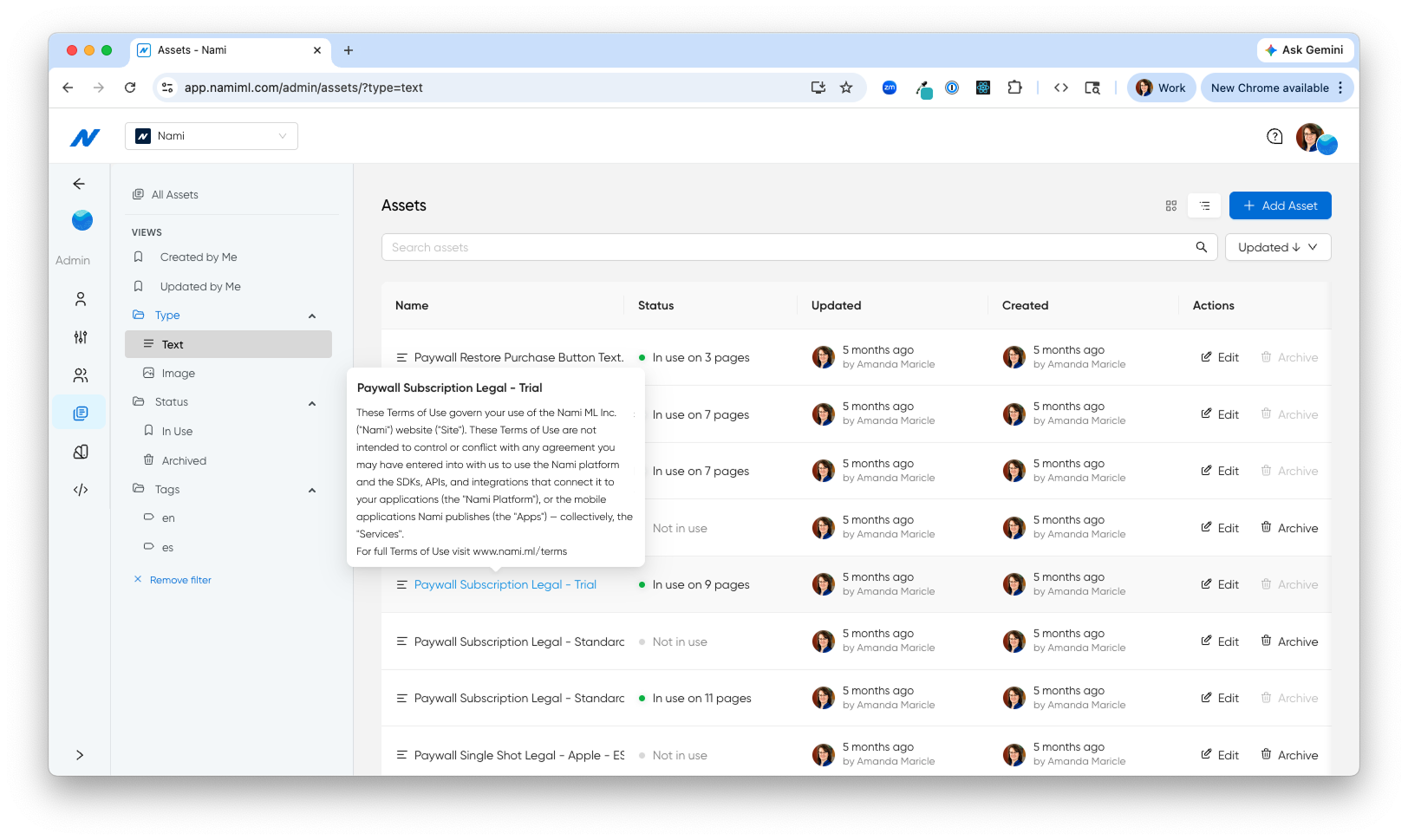
Assets List Quick Actions

Edit and archive assets faster from the redesigned list

The assets list now uses icon-based edit and archive actions with consistent column widths. Archive is disabled automatically when an asset is still in use, so teams can clean up the library without worrying about breaking a live page.

Read more

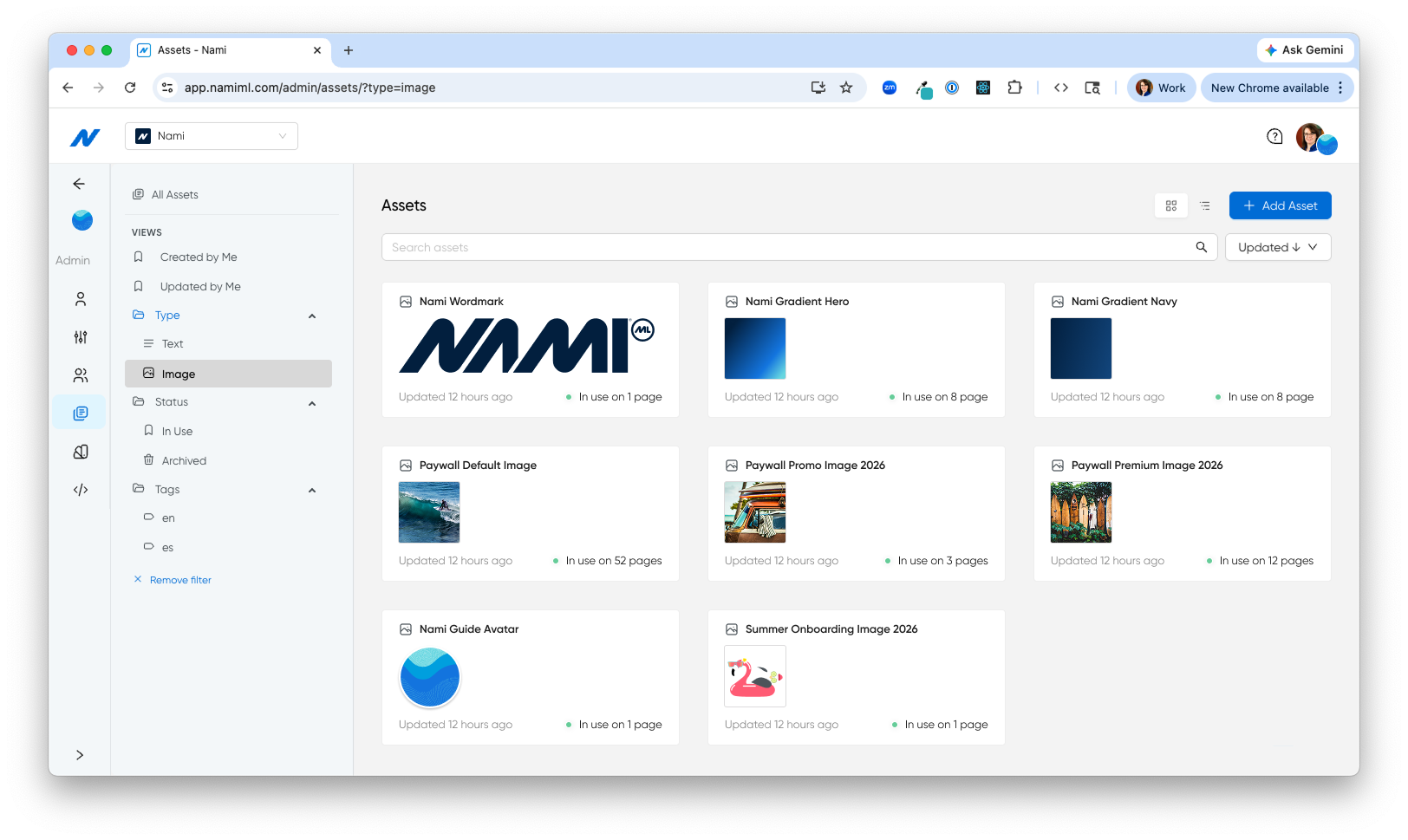
Assets Redesign

A file-explorer experience for managing assets at scale

Assets have a new home: a filterable table and grid view with click-to-edit modal overlays, plus a full-height sidebar layout that other dashboard pages will adopt next. Built for teams managing hundreds of assets across dozens of experiences.

Filter the library by type, by tag, or by whether an asset is in use — so the right asset is one click away whether you’re looking for a specific image, cleaning up archives, or auditing what’s referenced live.

Read more

Brand Palette Usage List

See every page using a brand palette before you edit it

Brand palettes now show a usage list inside the palette detail view, surfacing every page that references a palette in one place. Teams can gauge the impact of a color change before making it, instead of discovering it live.

Data Schema Table Standardized

A cleaner, more consistent data schema table

The data schema table now matches the assets table layout, with avatar-based Created and Updated columns and a dedicated Actions column with quick edit. One less inconsistency between dashboard surfaces, one less thing to re-learn.

Designer Role

Give brand designers focused access with the new Designer role

A new Designer role in the dashboard gives team members access to fonts, color palettes, and design assets without exposing analytics, campaigns, or billing. Brand contributors can manage visual identity while product and growth teams keep control of the rest.

Flow List Column Consistency

Flow list columns now match the rest of the dashboard

The flow list Created and Updated columns have been consolidated to show author avatar and date in a single cell, matching the assets table. Teams scanning across surfaces now see the same pattern everywhere.

Page Builder Detach Text Asset

Detach a text asset from a page with one click

Hovering over an asset reference in Page Builder’s text input now reveals an unlink icon. Click it to replace the reference with its current text value, useful when a page needs to diverge from a shared asset without losing the copy. The action is undoable.

Schema Version History

Inspect every previous version of a data schema in history

The data schema history tab now shows the full JSON of each previous version alongside the changelog message. Audit how a schema has changed over time without restoring or rebuilding, and see exactly what was different at each step.

Android Pricing Update

Pricing displays now reflect Android's latest one-time purchase format

Adapted to Android’s updated one-time purchase pricing API. Pricing on subscriber-facing pages stays accurate and current with the latest Google Play format — no manual adjustments required when Android changes how prices are structured.

Content Grid Layout

Display content in a grid format alongside your existing feeds

Pages now support a content grid as a layout variant of the content feed. Teams can choose between feed and grid formats to match the visual style of each experience — giving more control over how content appears to subscribers without building from scratch.

Data Schema Assets

Manage structured data assets directly in the dashboard

A new assets section in the data schema interface gives teams a dedicated space to manage structured data assets. View, organize, and reference data assets without leaving the dashboard.

Faster Pricing Loads

Pricing data in the dashboard now loads significantly faster

Optimized the pricing data endpoint that powers SKU pricing displays in the dashboard. Load times that previously took several seconds are now much faster, making it quicker to review and manage subscription pricing.

Launch Context No In-App Purchase

Launch experiences without an in-app purchase option

Launch context now supports a noInAppPurchase option. Teams can present subscriber experiences — announcements, content unlocks, upsell screens — without surfacing an IAP prompt when one is not needed, giving product teams finer control over when the purchase flow appears.

March 2026

Auto-Add Feed Components

Content feed setup now starts with a ready-to-use component

When adding content feed capability to a page, a starter component is now included automatically. One less manual step in the build process — teams go straight to customizing instead of starting from an empty container.

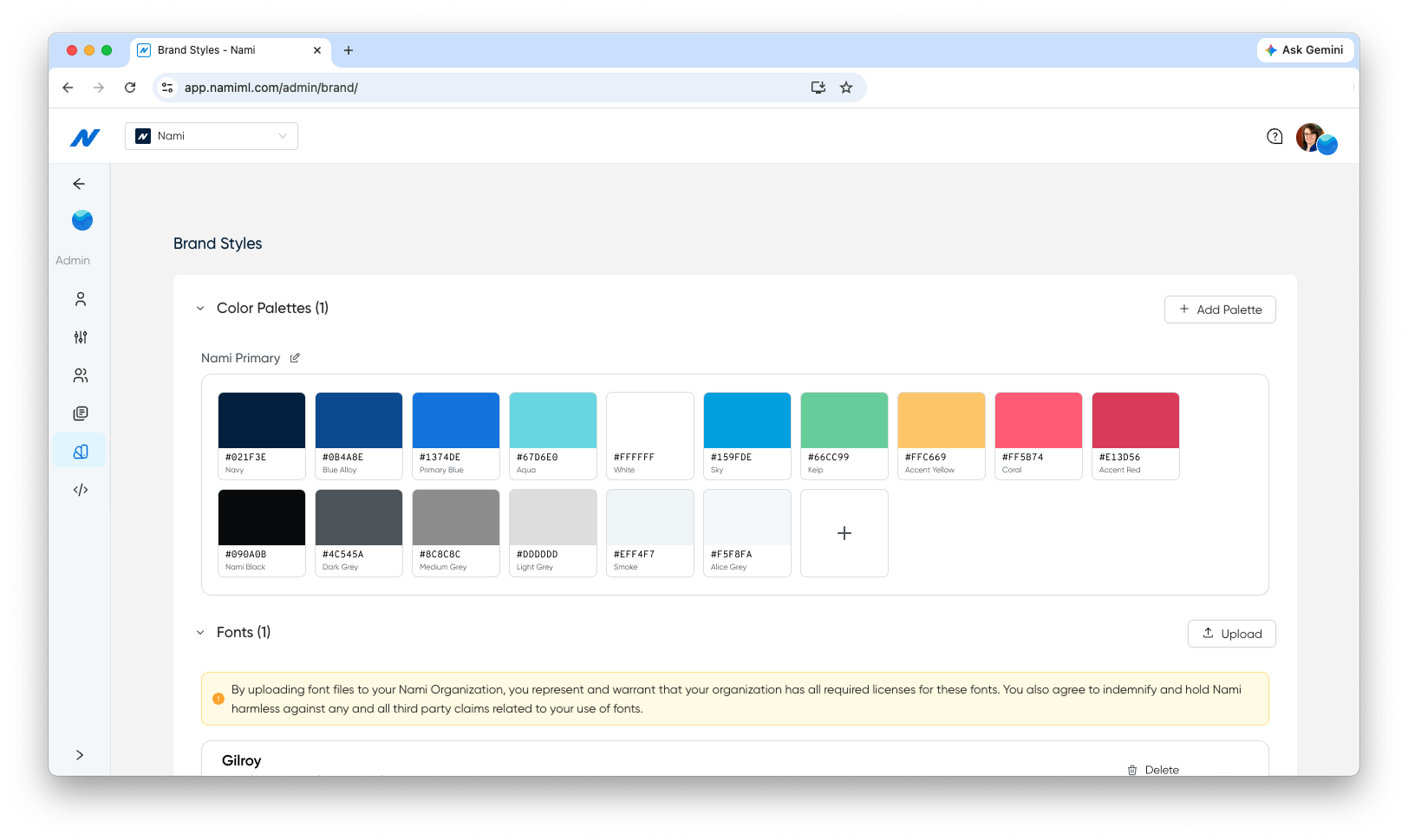
Brand Styles

Set up standard color palettes and fonts for one-click application to every Paywall

A new Brand Styles page in the dashboard brings fonts, color palettes, and design assets into one place. Configure your brand’s approved colors once, then apply them to any Paywall with a click — no more hunting for hex codes or copying values between pages.

Teams can manage the visual system that underpins every page and flow from one view, so updating typography or swapping a palette ripples through every page that uses it.

Read more

Color Picker Eyedropper

Sample any color from the canvas with the new eyedropper tool

Page Builder color picker now includes an eyedropper tool. Sample any color from the canvas and apply it directly — faster than switching to a design tool to grab a hex code.

CTV Manual Screenreader Text

Customize screenreader text on individual TV paywall elements

Page Builder now lets teams manually add screenreader text to individual TV paywall elements beyond the auto-generated defaults. Fine-tune accessibility for specific components when the automatic text doesn’t capture the right context.

Dynamic Product Groups

Control which offers subscribers see based on entry point

Apple and Android SDKs now support sending the current product group dynamically via launch context. Teams can control which offers a subscriber sees based on where they enter the experience — different entry points, different product sets, same flow.

Flow Branching on Web

Route web subscribers through different paths based on placement

Web now supports flow branching by placement label. The same conditional journey logic that works on mobile is available for web subscriber experiences — route subscribers down different paths based on where they entered the flow.

Flow Handoff Forms

Pass subscriber data between flow steps and external forms

Web flows now support handoff with form IDs. Teams can pass subscriber data between flow steps and external forms — useful for capturing additional information mid-journey without breaking the flow experience.

Half Sheet Presentation

Present subscriber experiences as half sheets on mobile

Apple and Android now support half sheet page presentation with a grow transition style. Subscriber experiences can slide up from the bottom of the screen instead of taking over full screen — giving teams a lighter, less intrusive way to present offers, upgrade prompts, or onboarding steps.

Read more

Page Builder Loading States

Subscribers see polished loading indicators while prices load

Pages now show a loading indicator while prices or offers are being fetched. Subscribers see a polished transition instead of blank space — a small detail that makes the experience feel designed, not assembled.

Roku Progress Bar

Guide CTV subscribers through multi-step flows with progress indicators

New progress bar and loading bar components for Roku. Subscribers see visual progress during multi-step CTV flows — onboarding sequences, plan selection, and account setup all feel more guided and polished.

Countdown Timer

Add animated countdown timers to create urgency

A new Countdown Timer component is available across platforms. Create urgency on limited-time offers with an animated countdown that automatically hides when the timer completes. Configurable duration, styling, and behavior.

Read more

Test ID Property

Target specific components by ID for automated testing

Teams running automated QA can target specific components by ID with a new testId property — making end-to-end testing of subscriber experiences more reliable and less dependent on visual selectors.

Web Carousel Indicators

Style custom navigation indicators on web carousels

Web carousels now support custom indicators — dots, arrows, or other navigation styles that match the look of each experience. Teams control how subscribers navigate through carousel content instead of being locked into a default style.

Web Flow Pause Control

Pause subscriber flows programmatically on web

A new static pause method lets teams programmatically pause subscriber flows on web. Useful when a flow should wait for an external event or user action before continuing — gives developers precise control over flow timing without rebuilding the flow itself.

Web Toggle Disabled State

Toggle switches in web experiences now support a disabled state

Web-rendered toggle switches can now display in a disabled state. Teams can use this to show subscribers options that exist but are not currently available — providing visual context instead of hiding controls entirely.

Web Loading Bar Component

Show progress on multi-step web flows

A new Loading Bar component is available for web. Subscribers see visual progress during multi-step flows — onboarding sequences, plan selection, and checkout all feel more guided and polished, matching what is already available on Roku.

Offline Detection Popup

Catch lost connections in the dashboard with a clear prompt

The dashboard now detects when a user loses their internet connection and surfaces an offline popup. Teams working in Page Builder and Flow Builder get an explicit warning before attempting to save work against a dropped connection.

SKU Smart Text

Display dynamic pricing and product details with Smart Text variables

Smart Text now supports SKU-based variables across pages, including new options for monthly, yearly, mo, and yr. Teams can dynamically display pricing, trial lengths, billing cadence, and product details using variables that resolve at render time — no hardcoded values, no manual updates when pricing changes.

Read more

Smart Text in Text Inputs

Insert SKU reference ID Smart Text directly into text inputs

Page Builder now supports inserting SKU reference ID Smart Text variables inside Text Input fields. Teams can reference dynamic product values wherever copy lives — not just standalone text components — for more flexible paywall and form design.

December 2025

Flow Builder Branching

Build personalized subscriber journeys with conditional branching

Flow Builder now supports full conditional branching, so teams can create subscriber journeys that adapt based on platform, region, segment, or behavior. Design branching paths visually — no engineering required — and test which journey structures drive the strongest conversion.

Read more

Asset Library

Manage and reuse creative assets from a single library

A centralized asset library for images, icons, and media used across pages and flows. Upload once, use everywhere. Update an asset in the library and it propagates across every page that references it — no more hunting through individual designs to swap a logo or hero image.

Read more

Offer Sync from Apple and Google

Sync promotional offers from Apple and Google automatically

Nami now syncs offers and pricing directly from the Apple App Store and Google Play. Promotional offers, introductory pricing, and subscription tiers stay current without manual updates — so the prices subscribers see always match what the app stores are charging.

Flow Builder Analytics Mode

See conversion data directly inside your subscriber flows

Analytics Mode overlays real performance data onto your flow canvas. See conversion rates, drop-off points, and experiment results at each step without switching between tools. Spot underperforming journey stages and iterate in the same interface where you build.

October 2025

CTV Onboarding Flows

Design connected TV onboarding experiences without code

Onboarding flows are now available for connected TV platforms — Apple TV, Roku, Fire TV, and more. Design the first experience new subscribers see on the big screen, with the same no-code tools teams already use for mobile and web. One dashboard, every screen.

Read more

New Conditions Builder

Target the right subscribers with a redesigned conditions engine

The conditions builder has been rebuilt from the ground up. Define targeting rules with a cleaner interface — combine platform, region, subscription status, and custom attributes to control exactly which subscribers see which experiences. More flexibility, less complexity.

Price Display from App Stores

Show real-time localized pricing from Apple and Google

Pages and paywalls now pull and display live pricing from the Apple App Store and Google Play, including localized currency formatting. Subscribers see the exact price they’ll pay — no hardcoded values, no currency mismatches across regions.

CRM Redesign

A faster, more flexible subscriber CRM

The subscriber CRM has been modernized for speed and flexibility. Search, filter, and segment subscribers more efficiently. View individual subscriber journeys, subscription history, and experiment exposure in one place — built to scale with growing subscriber bases.